





If you have access to the internet, it’s likely that you have already heard of the critical vulnerability in the Log4j library. A zero-day vulnerability in the Java library Log4j, with the assigned CVE code of CVE-2021-44228, has been disclosed by Chen Zhaojun, a security researcher in the Alibaba Cloud Security team. It’s got people worried—and with good reason.
This is a serious flaw that needs to be addressed right away, since it can result in remote code execution (RCE) in many cases. By now, I have seen many creative ways in which this can be used to infiltrate or disturb services. The right solution is to identify and patch your vulnerable Log4j installations to the fixed versions as soon as possible. If you are using Log4j, make sure you are following this page where you can find the latest news about the vulnerability.
What else should you be doing, though, for this and similar exploits? In this blog post, I’ll look at the impact of the vulnerability in a Kubernetes cluster, and share a couple of ways that you can prevent such vulnerabilities in the future.
How does the Log4j vulnerability work?
On its own, the Log4j vulnerability is just an entry point. What gives it the fuel to burn your holidays is the ability of an attacker to use this entry point and interact with the Java Naming and Directory Interface (JNDI) capability embedded inside the Java programming language.
By default, Log4j provides a lookup feature that is a great way to dynamically substitute special characters with values. One particular lookup that was used in the recent CVE is the JNDI Lookup, which allows variables to be retrieved from a variety of protocols.
$${jndi:logging/context-name}
JNDI is an Application Programming Interface (API) that provides naming and directory functionality for programmers, with the intention of making their life easy. Sadly, not in this case! JNDI supports a broad range of protocols to resolve the names, as shown in the below diagram from Oracle’s Getting Started guide for the JNDI.

Logging user-controlled data or an untrusted source will allow malicious users to take advantage of JNDI features in order to establish a connection to a remote location. They can then inject malicious executable code and compromise the target server hosting the Java application.
Now that we know how it is done, let’s see how the use of network policies could have prevented this type of attack in a Kubernetes cluster.
Preventing the Log4j zero-day vulnerability using a simple network security policy
Let’s start by acknowledging that the correct strategy is defense-in-depth. An appropriate CNI choice can definitely provide protection, but software should always be kept secure and up-to-date as well. With that said, a zero-trust environment could have limited the scope of this attack or in some cases prevented it from happening, by isolating pods.
Let’s create a local Kubernetes cluster.
kind create cluster --config - <<EOF
kind: Cluster
name: log4j-poc
apiVersion: kind.x-k8s.io/v1alpha4
networking:
  disableDefaultCNI: true
  podSubnet: "192.168.0.0/16"
nodes:
- role: control-plane
  extraPortMappings:
  - containerPort: 8080
    hostPort: 30950
- role: worker
EOF
Install tigera-operator and configure Calico.
kubectl create -f https://docs.projectcalico.org/manifests/tigera-operator.yaml
kubectl create -f https://docs.projectcalico.org/manifests/custom-resources.yaml
Use the following manifest to install the vulnerable pod.
kubectl apply -f https://raw.githubusercontent.com/frozenprocess/log4j-poc-demo/main/vulnerable-demo.yml
Before we dive into the exploitation, let’s briefly explore the environment architecture and what is going to happen.
In order to simulate an external request, I’m going to use Docker to run a container outside of the cluster that was created in the previous steps. I will hook the container to the kind network that is used by the cluster.
When the exploit container is running, it will fire up the metasploit framework and try to establish a connection to the cluster. It will do this by using the values that are automatically determined via the log4j-scanner container.
log4j-scanner is a simple container running the latest version of metasploit and using a log4shell scanner script to evaluate the existence of the vulnerability.Run the exploit.
docker run --rm --name log4j-poc-exploit --net kind rezareza/log4j-scanner
You should see a similar output indicating a successful attack. The output should show the version of Java used inside the vulnerable-pod.
[*] Started service listener on 172.18.0.4:389
[*] Scanned 1 of 2 hosts (50% complete)
[+] 172.18.0.2:30950 - Log4Shell found via / (header: Authorization) (java: Oracle Corporation_11.0.13)
Basically, the attacker sent a malicious request by including log4j special lookup format inside the HTTP request headers. In this attempt, the attacker is looking for ${sys:java.vendor} and ${sys:java.version}, which will be substituted by Log4j with the version of Java and the vendor providing it.
You can use the following command to check the actual request.
kubectl logs deployments/vuln-pod -n log4j-demo | egrep 'authorization
When a request is received by the vulnerable-pod it establishes a connection to the attacker’s server and sends back information revealing the version of Java used inside the vulnerable-pod.
Here is the output taken from the log4j-scanner.
[+] 172.18.0.2:30950 - Log4Shell found via / (header: Authorization) (java: Oracle Corporation_11.0.13)
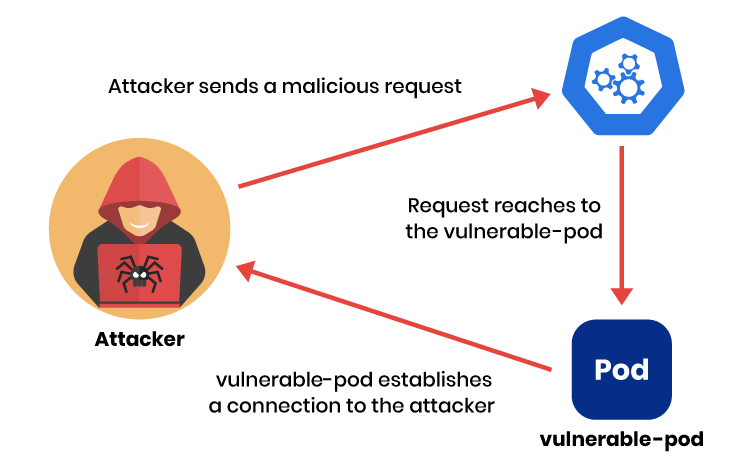
It is possible to manually verify which version of java vulnerable-pod is using by executing the following command:
kubectl exec -it deployments/vuln-pod -n log4j-demo -- java --version
You should see a result similar to the below.
openjdk 11.0.13 2021-10-19
OpenJDK Runtime Environment 18.9 (build 11.0.13+8)
OpenJDK 64-Bit Server VM 18.9 (build 11.0.13+8, mixed mode, sharing)
As I’ve mentioned before, in a zero-trust environment, all resources are considered compromised and need to be put in isolation. This can easily be achieved by using a Calico GlobalNetworkPolicy since this type of policy affects the cluster as a whole.
apiVersion: projectcalico.org/v3
kind: GlobalNetworkPolicy
Just like any other Kubernetes resource, a GlobalNetworkPolicy can use all Kubernetes supported annotations to help maintain and manage this resource.
metadata:
name: deny-app-policy
The types attribute in the manifest defines which direction of traffic should be affected by this rule. In this example, let’s apply this rule to both ingress (inbound) and egress (outbound) traffic.
types:
- Ingress
- Egress
egress: expands the description of our outgoing rule to implement an exception for pods that need to talk to Kubernetes DNS service.
egress:
# allow all namespaces to communicate to DNS pods
- action: Allow
protocol: UDP
destination:
selector: 'k8s-app == "kube-dns"'
ports:
- 53
This namespaceSelector is a general way to exclude kube-system and calico-system namespaces from our policies.
namespaceSelector: has(projectcalico.org/name) && projectcalico.org/name not in {"kube-system", "calico-system"}
A complete global network security policy looks like this:
kubectl apply -f - <<EOF
apiVersion: projectcalico.org/v3
kind: GlobalNetworkPolicy
metadata:
 name: deny-app-policy
spec:
 namespaceSelector: has(projectcalico.org/name) && projectcalico.org/name not in {"kube-system", "calico-system"}
 types:
 - Ingress
 - Egress
 egress:
 # allow all namespaces to communicate to DNS pods
 - action: Allow
   protocol: UDP
   destination:
     selector: 'k8s-app == "kube-dns"'
     ports:
     - 53
EOF
Now that we have established isolation inside our cluster, let’s create individual exceptions for our service, allowing it to work properly.
Calico offers NetworkPolicy resources that can affect individual namespaces.
apiVersion: projectcalico.org/v3
kind: NetworkPolicy
metadata:
name: restrict-log4j-ns
namespace: log4j-demo
Just like a GlobalNetworkPolicy a NetworkPolicy can be applied to both ingress (inbound) and egress (outbound) traffic.
spec:
types:
- Ingress
- Egress
The vulnerable-pod uses port 8080 to publish its service. We need an ingress and egress policy to allow both inbound and outbound traffic to be established from that port.
ingress:
- action: Allow
metadata:
annotations:
from: www
to: vuln-server
protocol: TCP
destination:
ports:
- 8080
A complete policy looks like this:
kubectl apply -f - <<EOF
apiVersion: projectcalico.org/v3
kind: NetworkPolicy
metadata:
 name: restrict-log4j-ns
 namespace: log4j-demo
spec:
 types:
 - Ingress
 - Egress
 ingress:
 - action: Allow
   metadata:
     annotations:
       from: www
       to: vuln-server
   protocol: TCP
   destination:
     ports:
     - 8080
 egress:
 - action: Allow
   metadata:
     annotations:
       from: vuln-server
       to: www
   protocol: TCP
   source:
     ports:
     - 8080
EOF
Now that we have secured our workloads, let’s execute the exploit again.
docker run --rm --name log4j-poc-exploit --net kind rezareza/log4j-scanner
This time you should see an output similar to:
[*] Started service listener on 172.18.0.4:389
[*] Scanned 1 of 2 hosts (50% complete)
[*] Scanned 1 of 2 hosts (50% complete)
[*] Scanned 1 of 2 hosts (50% complete)
[*] Scanned 1 of 2 hosts (50% complete)
[*] Scanned 1 of 2 hosts (50% complete)
You can also verify the failing connections inside the vulnerable-pod by using the following command:
kubectl logs deployments/vuln-pod -n log4j-demo | egrep 'java.net.ConnectException: Connection timed out'
Let’s explore what just happened. Since our workload is placed in isolation, it can not establish a connection to the remote server. After an attacker sends the malicious request, it gets substituted by log4j with the internal java values, but this time when vulnerable-pod tries to contact the attacker to send back the collected information, it will be denied by the policies that were just applied to the cluster.
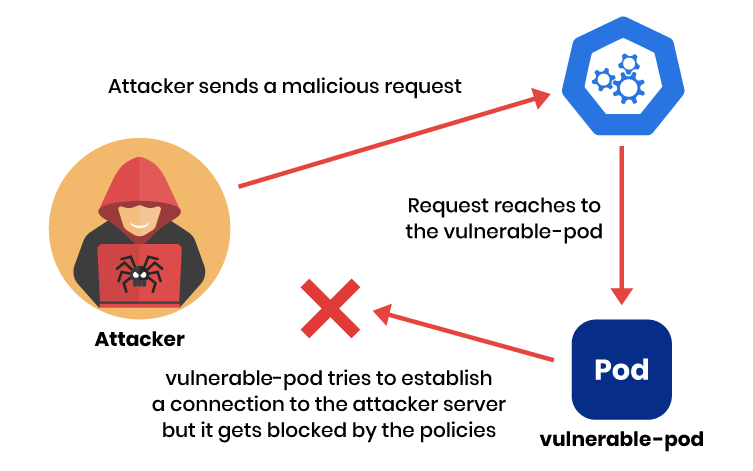
It is worth mentioning that the concept of zero trust goes beyond simple network isolation. In fact, zero-trust design principles expand to users, applications, permissions encryption, and much more. By involving all of these factors, a well-designed environment with zero-trust principles stands a good chance of limiting the scope of future attacks like Log4j.
Cleanup
If you’d like to remove all of the resources created by this tutorial, run the following command:
kind delete cluster --name log4j-poc
Conclusion
There is always a trade-off between security, convenience, and time. As we have explored in this post, by sacrificing some convenience and implementing a few simple network policies, an attacker using the recent 0-day Log4j CVE would’ve had a much harder time completing their attack.
If you enjoyed this article, you might also like:
- Kubernetes security policy: 10 best practices
- Understanding Calico’s policy enforcement options
- Free, self-paced Calico certification course
- Free, online webinars, workshops, and resources
- Learn about Calico Cloud
Related Guides:
- Kubernetes Security: 8 Best Practices to Secure Your Cluster
- Kubernetes Networking: The Complete Guide
- Microsegmentation Security: The Evolution of Cybersecurity in a Zero Trust World
Related Products:


