Tip Sheet: AI Role Play

  • August 25, 2025
  • 17 replies
  • 413 views
Courtney-Community Manager
Certified Community Champion
Forum|alt.badge.img+19


Provide hands-on practice aligned with your priorities.
 

LinkedIn Learning Hub users can create new role play scenarios tailored to your organization’s needs, using org-specific frameworks and best practices. You can share a link directly to this role play scenario with others at your organization, or embed into training assets, to support live practice in context.


How to Use this Tip Sheet

This tip sheet is your step-by-step companion for bringing custom role play scenarios to life. Here’s how to get the most out of it:

💡 Get Inspired: Review case studies to see what’s possible.

✔️ Follow the Steps: Walk through the process to create, edit, and assign scenarios.

❓ Find Answers: Use the FAQs to clarify your customization and curation questions.

🎯 Apply Best Practices: Use pro tips to align with frameworks and measure engagement.

🏁 Take Action: Build your first custom role play scenario today.

📍 Tip: Download the .pdf below.

⭐️ Exclusive to LinkedIn Learning Hub customers.

17 replies

jessicajjones
Community Influencer
Forum|alt.badge.img+5
  • Community Influencer
  • September 11, 2025

This was an exciting video update - but I didn’t see in the video how I can create a scenario as an admin and embed into training assets such as a collection or a learning path. 


wmastrocola
Community Influencer
Forum|alt.badge.img+2
  • Community Influencer
  • September 12, 2025

Quick Q: I have viewed the AI role play video, but do not see the related toolkit. Please advise where I can access. Thank you!


Cadenmorley
Community Learner
Forum|alt.badge.img+2
  • Community Learner
  • September 13, 2025

That’s a really exciting feature! AI role play seems like a powerful way to make training more interactive and practical — much better than just reading theory. I like that it allows organizations to create custom scenarios using their own frameworks, which makes the training highly relevant for employees. Embedding these scenarios into existing training materials sounds like it could really boost engagement and retention. Definitely something I’d recommend exploring for teams looking to improve their skills quickly and effectively.


Courtney-Community Manager
Certified Community Champion
Forum|alt.badge.img+19

Hi ​@jessicajjones & ​@wmastrocola Great callout! Let me look into this and I’ll tag you again once I have located the toolkit and a deeper dive knowledge base article. Stay tuned!


Rachel Alphonso
Certified Community Newcomer
Forum|alt.badge.img+1
  • Certified Community Newcomer
  • October 7, 2025

Hi! I’m trying to create AI Role Plays as an admin for my organization but I don’t see the option in the learning admin tab. 


Courtney-Community Manager
Certified Community Champion
Forum|alt.badge.img+19

Hey ​@jessicajjones & ​@wmastrocola ! Updated this article with the new demo video and attached the downloadable toolkit / tip sheet. Take a look!


Courtney-Community Manager
Certified Community Champion
Forum|alt.badge.img+19

Hi ​@Rachel Alphonso Looking at the new tip sheet > Step 2 - Do you see Create role play in the Add menu of your custom library? See screenshot below.


Rachel Alphonso
Certified Community Newcomer
Forum|alt.badge.img+1
  • Certified Community Newcomer
  • October 8, 2025

@Courtney-Community Manager - Thank you very much! I’m able to see the option in the admin hub now.


Courtney-Community Manager
Certified Community Champion
Forum|alt.badge.img+19

@Rachel Alphonso Excellent! Report back how it goes!


wmastrocola
Community Influencer
Forum|alt.badge.img+2
  • Community Influencer
  • October 9, 2025

Hi ​@jessicajjones & ​@wmastrocola Great callout! Let me look into this and I’ll tag you again once I have located the toolkit and a deeper dive knowledge base article. Stay tuned!

Thank you Courtney!!


jessicajjones
Community Influencer
Forum|alt.badge.img+5
  • Community Influencer
  • October 24, 2025

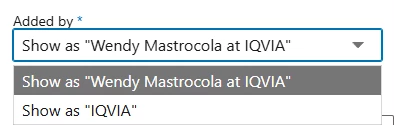
@Courtney-Community Manager Thank you for these updates! This is helpful. My concern with the current way to share a role play I create, any user who tries it will see they will see my name as the creator and not that it was created by my company. Given our size, the majority of employees don’t know who I am and may be concerned about privacy when taking the role play and see an individual’s name they don’t know attached to it and not that is is created by the organization. 


wmastrocola
Community Influencer
Forum|alt.badge.img+2
  • Community Influencer
  • October 29, 2025

@Courtney-Community Manager Thank you for these updates! This is helpful. My concern with the current way to share a role play I create, any user who tries it will see they will see my name as the creator and not that it was created by my company. Given our size, the majority of employees don’t know who I am and may be concerned about privacy when taking the role play and see an individual’s name they don’t know attached to it and not that is is created by the organization. 

We are in a similar position at my organization for sharing and creation. We would like to see a role play update that reflects what was done within the Curator role when developing a learning path, so that the author/owner has the option to show their name or change to company name as in the screenshot below. ​@Courtney-Community Manager Do you know or can you inquire whether this is already on the roadmap or help us submit as enhancement request? Please feel free to reach out for any clarifications. Thanks in advance!


Courtney-Community Manager
Certified Community Champion
Forum|alt.badge.img+19

Hey Wendy ​@wmastrocola Checking! If it is NOT on the roadmap yet for some reason, would you like for me to add as a Product Idea?


wmastrocola
Community Influencer
Forum|alt.badge.img+2
  • Community Influencer
  • November 5, 2025

Hey Wendy ​@wmastrocola Checking! If it is NOT on the roadmap yet for some reason, would you like for me to add as a Product Idea?

When I looked last night at creating a new role play, appears that similar options are now available, so I either missed it or it is new enhancement… this is great!


jessicajjones
Community Influencer
Forum|alt.badge.img+5
  • Community Influencer
  • November 5, 2025

@wmastrocola Thanks for sharing!!

I just went to my admin account and went to our library and not only saw a new option on the “Add” button to add a role play, but also have similar options to select in the Settings to show who it’s added by!! 🎆So EXCITING🎆 I already know how I’m going to use this feature!!! 


Courtney-Community Manager
Certified Community Champion
Forum|alt.badge.img+19

GREAT news ​@jessicajjones - Would seriously love to hear how you put this in ‘play’ - no pun intended!


jessicajjones
Community Influencer
Forum|alt.badge.img+5
  • Community Influencer
  • November 20, 2025

I’ve created two custom role plays already! One about having a conversation about self-care boundaries with a manger and the other about discussing suspected AI use with a student after it was stated it was not allowed!